Sorry - this post has moved!
> Please click here to find it <
Friday, September 2, 2011
Friday, August 26, 2011
Creating a Reviews Tab on your Facebook Page
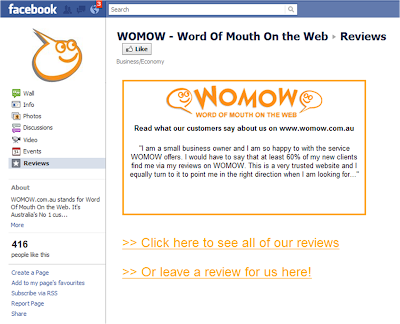 Following our recent description of how Genius Printing had created a Reviews Tab on their Facebook page, we had several enquiries asking for detailed instructions on how to do this. So, if you want to create a page like this one, here's how...
- Firstly you need to add a static HTML application to your business' Facebook page. There are lots that will do the job, but we used this one: http://www.facebook.com/add.php?api_key=190322544333196&pages
Click to Add this to your Facebook page.
- Next you need to change the name of this tab (the default name for this one is "Welcome"). To do this, go to the "Apps" menu option for your Facebook page, and find this app (called "Static HTML: iframe tabs"). Under this, click on "Edit Settings" and then change the Custom Tab Name to "Reviews" and click save.
- Then click "View Page" to see your Facebook page. On the left, you'll now see your new "Reviews" tab as a menu item. Click the "EDIT" link just under this.
- Next you need to add the content for this page. You can have different content for people that "like" your page, or the same content for everyone. (We just did the same content for everyone.) In the top box, enter the HTML, Javascript or other code for the content you wish to appear (could be an image as well).
- To add the WOMOW Widget that scrolls through your reviews, you'll need to get your unique code for this from us. You can customise this as you please but the exact code that we entered is shown below:

- Please note that the text in red here should specifically relate to your business listing on WOMOW. We also changed the width and height of the widget to be 500 x 300 (shown in the first red section).
- Once you've done that, just click "Save and View Tab" at the top of the page. (While we were editing, we found it easier to open up the Facebook page in another browser and refresh this until we were happy with it.)
- Good luck!


Thursday, July 28, 2011
Tuesday, July 26, 2011
Promoting your Reviews on Facebook
 Does your business have a Facebook page? You could be using your WOMOW reviews to show your Facebook fans how important customer service is to your business. It's a great way to give people more confidence in your service and convert browsers into buyers.
That's exactly what Genius Printing has recently done. They've cleverly created a new "Reviews on WOMOW" page and loaded up their WOMOW Widget which automatically shows their recent reviews*.
They've also included the WOMOW Widget and "Review Us" button on the bottom of their webpages. Click here to see this.
 “Imagine if on the door of every store, there was an LCD display showing the feedback from the last 5 customers. You would instantly be able to see what kind of service you're going to get,
before you even walk in the door,” Rob from Genius Printing says.
“Our business is built on customer service and we’ve always placed a high emphasis on collecting and displaying customer feedback. With WOMOW, we’re taking this a step further by having feedback at an independent site that's trusted by consumers.”
To encourage customers to leave reviews, Genius Printing are now offering a 10% discount voucher to customers that post their feedback on WOMOW. And to increase their exposure on WOMOW and give people an extra reason to choose them, on their WOMOW listing, Genius Printing have included a special offer for all new customers.
 This is a fantastic example of customer feedback becoming a true integrated marketing program. (I guess they're not named "Genius" for nothing!)
Is your business integrating customer reviews into your marketing and promotions?
PS - Many businesses also use their new reviews as a chance to post something new up on their Facebook Wall. eg "Thanks so much for your feedback MarkS. So glad to hear you're enjoying your canvas prints. They certainly were stunning!" + link to the review.
* Genius Printing have created this page in Facebook using a static HTML app for facebook (of which there are lots). These apps allow you to create a custom tab, with standard HTML code. They've simply pasted in the WOMOW code for the Widget. You can also link to images on other sites and put standard text and other HTML in here.
Saturday, July 23, 2011
Tuesday, July 19, 2011
Subscribe to:
Posts (Atom)
